Creating a workspace that supports both focus and comfort is essential for productivity, whether you work from home or in an office. A well-organized, ergonomic desk setup can reduce fatigue, prevent discomfort, and help you maintain concentration throughout the day. In this post, we’ll explore practical tips to optimize your desk environment for both comfort and efficiency.
Why Your Desk Setup Matters
Your desk setup affects more than just your aesthetics—it impacts your physical health, mental clarity, and overall work performance. Poor ergonomics can lead to neck and back pain, eye strain, and fatigue, while a cluttered environment can distract you or slow you down. By setting up your desk thoughtfully, you create a space that supports long hours of focused work comfortably.
Choose the Right Desk and Chair
Desk Height and Size
– Aim for a desk height where your elbows can rest comfortably at about 90 degrees when typing or writing.
– Consider the size of your workspace; it should accommodate your computer, accessories, and allow room to spread out papers or other work materials.
– Adjustable desks or standing desks give flexibility to change positions during the day, which can help reduce stiffness and fatigue.
Ergonomic Chair
– Invest in a chair with adjustable height, lumbar support, and a comfortable seat cushion.
– Your feet should rest flat on the floor (or on a footrest), and your knees should be roughly level with your hips.
– A chair with armrests can help reduce shoulder and upper back strain, but ensure they don’t interfere with keyboard positioning.
Position Your Monitor Correctly
– Place your monitor about an arm’s length away to reduce eye strain.
– The top of the screen should be at or slightly below eye level so your neck remains neutral when looking at the screen.
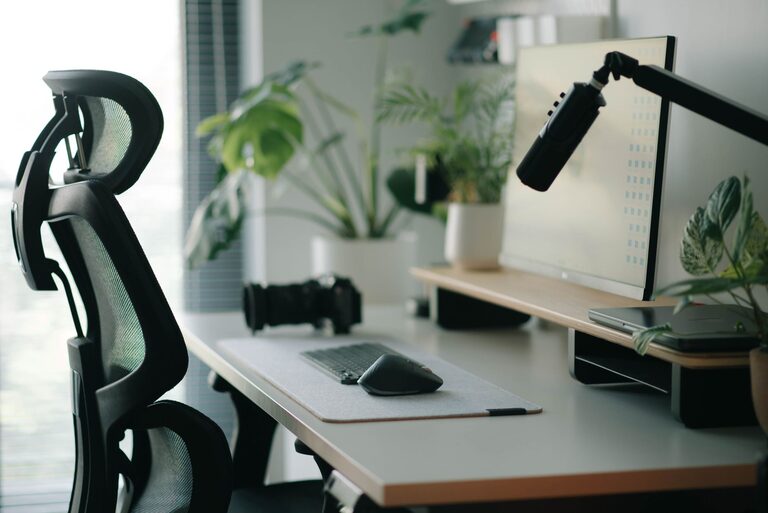
– Use a monitor riser or adjustable stand if needed.
– If using multiple monitors, arrange them so you don’t have to turn your head excessively.
Organize Your Desk for Minimal Distraction
Keep Essentials Within Reach
– Frequently used items like pens, notebooks, or your phone should be easily accessible to avoid constant reaching.
– Use desk organizers or trays to keep these items tidy and within view.
Manage Cables
– Use cable clips or sleeves to group cables together, keeping them out of your way and reducing clutter.
– Wireless accessories can also help minimize tangled cords.
Declutter Regularly
– A clean desk can help clear your mind and boost focus.
– Remove unnecessary papers or items that don’t serve your daily tasks.
Improve Lighting to Reduce Eye Strain
– Use natural light where possible, positioning your desk near a window but avoiding glare on your screen.
– Supplement with adjustable desk lamps that provide bright, focused light without harsh shadows.
– Avoid overhead lighting that creates glare or flickers.
Enhance Comfort with Accessories
Keyboard and Mouse
– An ergonomic keyboard and mouse can reduce strain on your wrists.
– Position them so your wrists remain straight, and your forearms are parallel to the floor.
Wrist Rest and Footrest
– A wrist rest can help maintain a neutral wrist position.
– A footrest can improve circulation and reduce pressure on your lower back if your feet don’t touch the floor comfortably.
Personal Comfort Items
– Add a small plant or photo for a calming effect.
– Use noise-cancelling headphones or soft background music if noise disrupts your focus.
Maintain Good Posture and Take Breaks
– Sit with your back against the chair, shoulders relaxed.
– Keep your head aligned with your spine — avoid leaning forward.
– Stand, stretch, or walk every 30 to 60 minutes to prevent stiffness.
Customize Your Setup to Your Work Style
Everyone’s needs are different. Some people benefit from dual monitors, others prefer a minimalist setup. Experiment with different arrangements and tools until you find what helps you concentrate and feel comfortable.
—
By investing time in setting up your workspace with these tips, you can create a desk environment that supports your focus and comfort all day long. Remember, a thoughtful desk setup is an investment in your health and productivity. Start small, adjust as you go, and enjoy a better workday!